> ## Documentation Index
> Fetch the complete documentation index at: https://playcamp.io/docs/llms.txt
> Use this file to discover all available pages before exploring further.
# WebView Integration
> Boost and coupon features via PlayCamp WebView
Provide boost and coupon features using PlayCamp's web-based UI.
## Overview
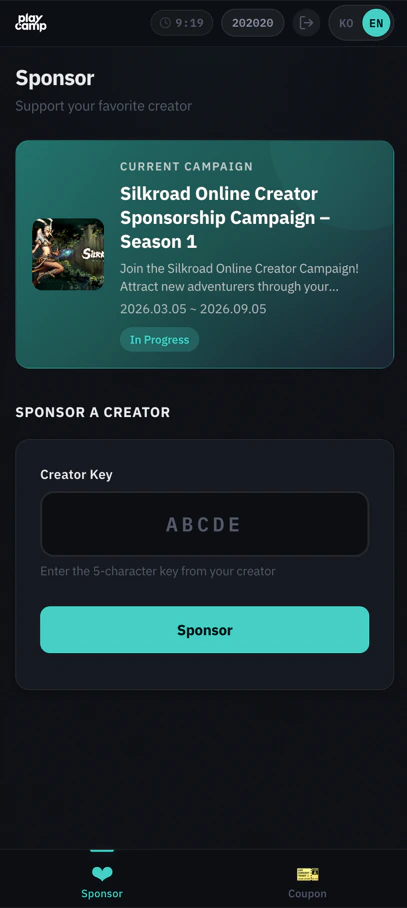
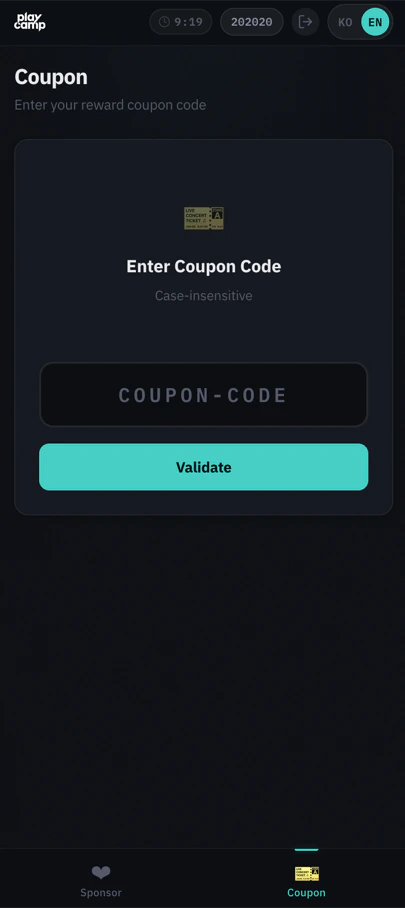
WebView is a boost/coupon management web UI provided by PlayCamp. It works in both in-game embedded browsers (WebView) and external browsers. You can provide Creator Boost and coupon features without building custom UI.
Both in-game embedded browsers and external browsers (mobile/PC) are supported. Choose the approach that fits your game environment.
### Server API Direct Integration vs WebView
| Item | Server API Direct Integration | WebView |
| -------------------------- | -------------------------------------- | ------------------------------------------------ |
| **UI Development** | Game studio must implement | Provided by PlayCamp (no additional development) |
| **Integration Difficulty** | Individual integration per API | Only 1 API for OTT issuance |
| **Customization** | Full freedom | Theme color/font customization |
| **Multilingual** | Game studio handles | Auto-supported (Korean/English) |
| **Best For** | When game UX must be perfectly matched | When you want to provide features quickly |
WebView and Server API direct integration can be used simultaneously. For example, you can handle boost via WebView and payment registration via Server API.
### Architecture
```mermaid theme={null}
sequenceDiagram
participant C as Game Client
participant S as Game Server
participant P as PlayCamp SDK API
C->>S: 1. Request to open WebView
S->>P: 2. Request OTT (Server Key)
P-->>S: 3. Return OTT
S-->>C: 4. Pass OTT
C->>P: 5. Open WebView (/webview/?ott=xxx)
C->>P: 6. User interaction (boost/coupon)
P-->>S: 7. Receive results via webhook
```
## Integration Flow
Issue an OTT (One-Time Token) from the game server using the Server API Key.
Open the WebView with the OTT received from the game server as a URL parameter.
```
https://sandbox-sdk-api.playcamp.io/webview/?ott={token}
```
Users can register/change/remove Creator Boost, validate/redeem coupons in the WebView. No additional game server processing is needed.
Events from WebView (boost registration, coupon redemption, etc.) are delivered to the game server via webhooks.
## OTT Issuance API
### Request
```bash theme={null}
curl -X POST "https://sandbox-sdk-api.playcamp.io/v1/server/webview/ott" \
-H "Authorization: Bearer ak_server_xxx:secret" \
-H "Content-Type: application/json" \
-d '{
"userId": "user_12345"
}'
```
```typescript theme={null}
const result = await server.webview.createOtt({
userId: 'user_12345',
campaignId: 'campaign_123', // optional
codeChallenge: 'challenge_value', // optional
callbackId: 'cb_001', // optional
metadata: { key: 'value' }, // optional
});
console.log(result.ott); // one-time token
console.log(result.expiresAt); // expiry time (ISO 8601)
```
```go theme={null}
result, err := server.Webview.CreateOTT(ctx, playcamp.WebviewOttParams{
UserID: "user_12345",
CampaignID: "campaign_123", // optional
CodeChallenge: "challenge_value", // optional
CallbackID: "cb_001", // optional
Metadata: map[string]any{"key": "value"}, // optional
})
fmt.Println(result.OTT) // one-time token
fmt.Println(result.ExpiresAt) // expiry time
```
### Parameters
| Field | Type | Required | Description |
| --------------- | ------ | -------- | ------------------------------------------------------------ |
| `userId` | string | Yes | In-game user identifier |
| `campaignId` | string | - | Scope WebView to a specific campaign |
| `codeChallenge` | string | - | PKCE S256 challenge (Base64URL-encoded SHA256, 43-128 chars) |
| `callbackId` | string | - | Webhook tracking ID |
| `metadata` | object | - | Additional metadata (stored in session) |
### Response (201 Created)
```json theme={null}
{
"data": {
"ott": "a1b2c3d4e5f6...64char_hex",
"expiresIn": 60
}
}
```
| Field | Description |
| ----------- | ---------------------------------------- |
| `ott` | One-Time Token (64-character hex string) |
| `expiresIn` | Time until expiry (seconds, default 60) |
OTT is **single-use** with a **60-second TTL**. Open the WebView promptly after issuance. It must be issued from the **game server** — issuing from the client would expose the Server Key.
## WebView URL Configuration
### Base URL
| Environment | URL |
| ----------- | ---------------------------------------------------------- |
| **Sandbox** | `https://sandbox-sdk-api.playcamp.io/webview/?ott={token}` |
| **Live** | `https://sdk-api.playcamp.io/webview/?ott={token}` |
### Option Parameters
| Parameter | Description | Example |
| --------- | -------------------------------------- | ------------------------------ |
| `lang` | Language setting (ko, en) | `?ott=xxx&lang=en` |
| `tabs` | Limit displayed tabs (comma-separated) | `?ott=xxx&tabs=sponsor,coupon` |
**tabs options**
| Value | Description |
| ----------- | --------------------- |
| `sponsor` | Boost management tab |
| `coupon` | Coupon redemption tab |
| `campaigns` | Campaign list tab |
| `creators` | Creator search tab |
If `tabs` is not specified, default tabs are displayed (sponsor, coupon).
### Theme Customization
Customize WebView colors and fonts via URL parameters.
| Parameter | Description | Default | Example |
| -------------- | ------------------------- | ---------------- | ------------------------- |
| `primaryColor` | Button/accent color (hex) | Game theme color | `primaryColor=FF6B35` |
| `bgColor` | Background color (hex) | Dark theme | `bgColor=1a1a2e` |
| `textColor` | Text color (hex) | Light text | `textColor=ffffff` |
| `fontFamily` | Font family | System default | `fontFamily=Noto Sans KR` |
Enter hex color values without `#`. Example: `primaryColor=FF6B35`
**Full example**
```
/webview/?ott=xxx&lang=ko&tabs=sponsor,coupon&primaryColor=FF6B35&bgColor=1a1a2e&textColor=ffffff
```
## Key Features
### Boost Management
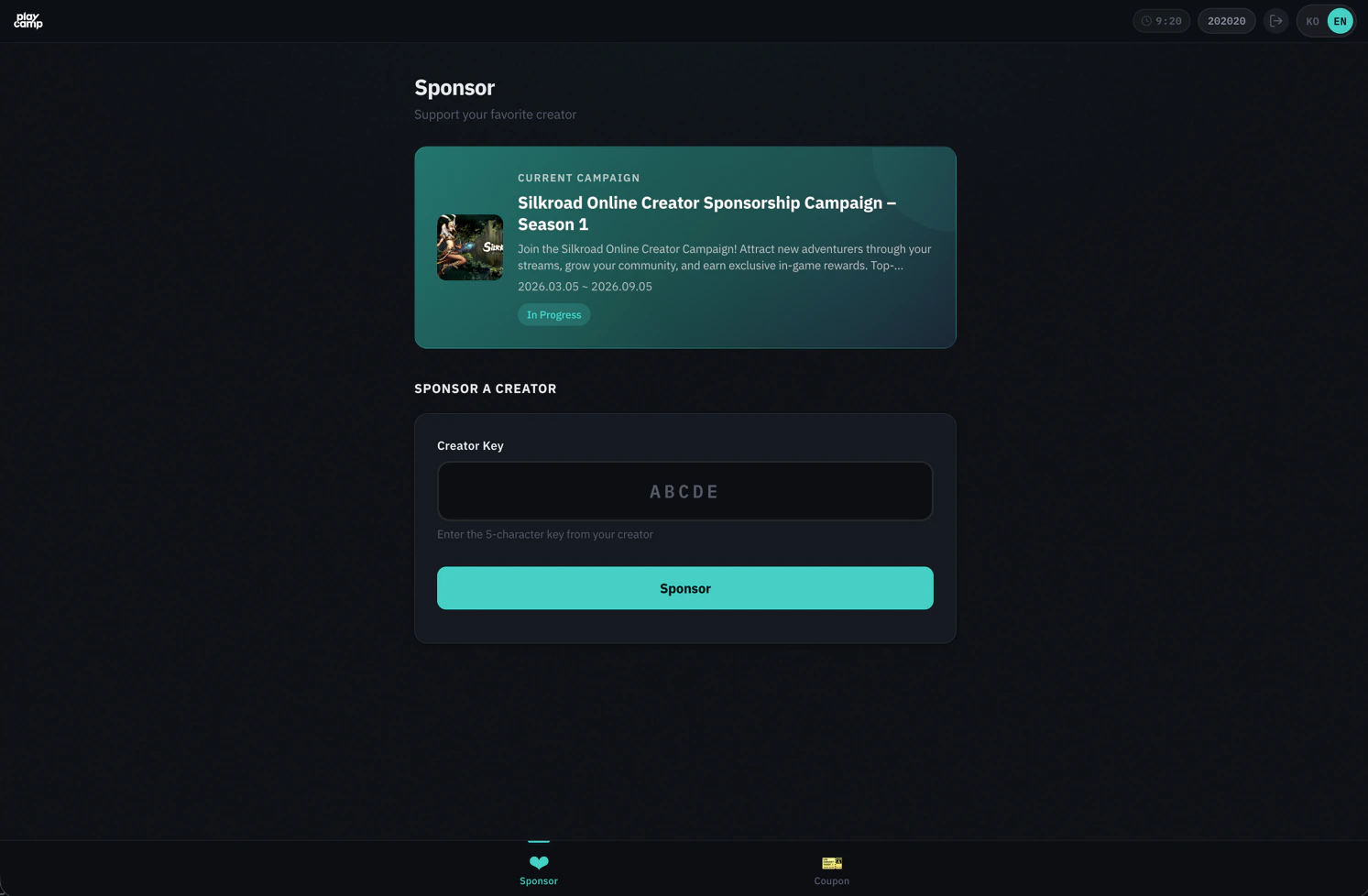
Users can search for creators and register/change/remove boosts in the WebView.
* **Creator Search**: Search by creator key or name (real-time autocomplete)
* **Register Boost**: Register boost for selected creator
* **Change Boost**: Change to a different creator (30-day cooldown applies)
* **Remove Boost**: Remove current boost
 **Creator Key Prefill**
Include a creator key in the URL to prefill the search form:
```
/webview/?ott=xxx#sponsor?creatorKey=ABC12
```
### Coupon Redemption
Coupons are redeemed in 2 steps: Validate → Redeem
* **Code Input**: 5-50 characters, auto uppercase conversion
* **Validation**: Check validity and preview reward items
* **Redemption**: Confirm to finalize (returns usage ID)
**Creator Key Prefill**
Include a creator key in the URL to prefill the search form:
```
/webview/?ott=xxx#sponsor?creatorKey=ABC12
```
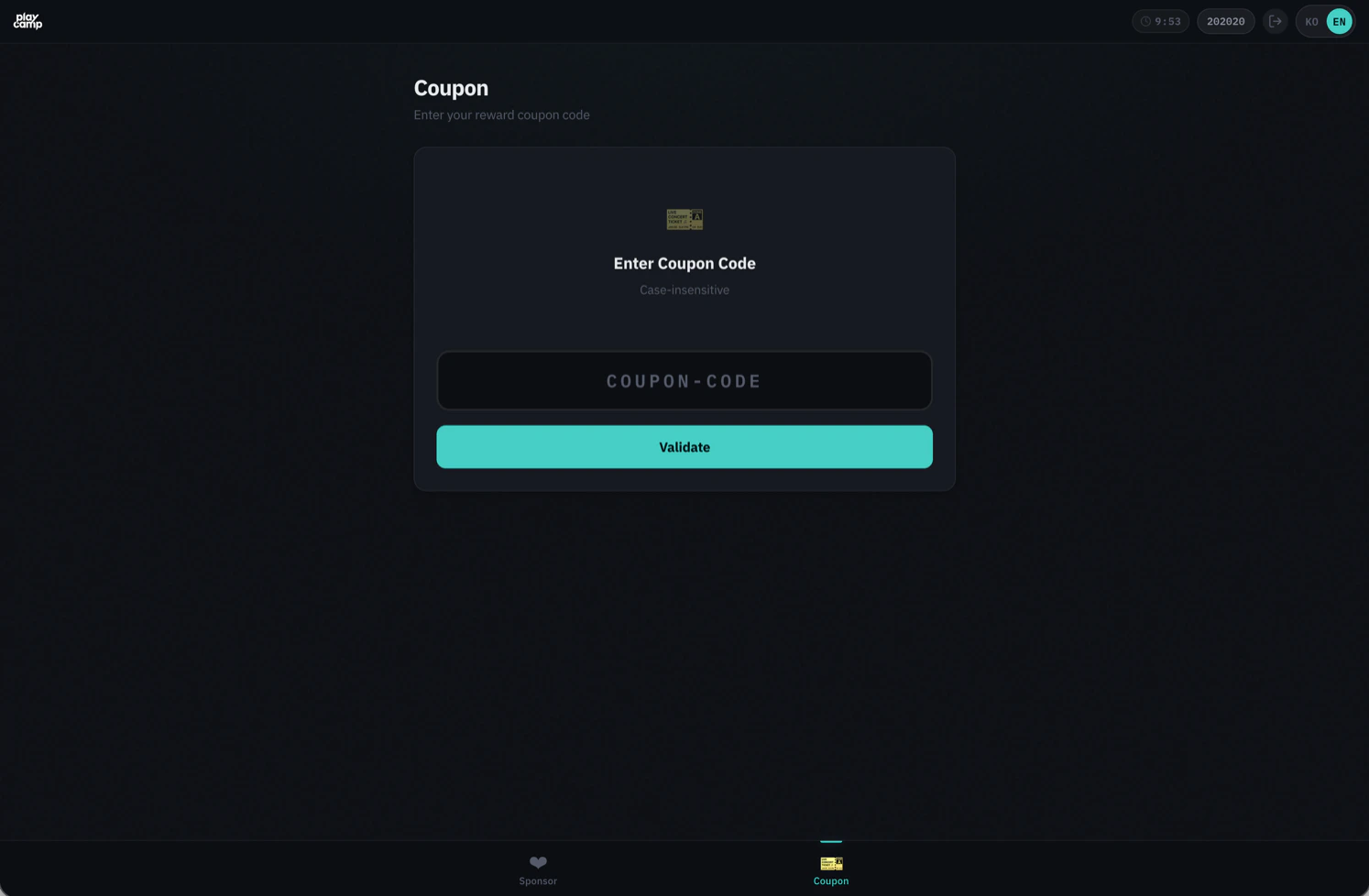
### Coupon Redemption
Coupons are redeemed in 2 steps: Validate → Redeem
* **Code Input**: 5-50 characters, auto uppercase conversion
* **Validation**: Check validity and preview reward items
* **Redemption**: Confirm to finalize (returns usage ID)
 ## Webhook Event Integration
Actions performed by users in the WebView are delivered to the game server via webhooks.
### Events from WebView
| Event | Description | Key data fields |
| ----------------- | ---------------- | ------------------------------------------- |
| `sponsor.created` | Boost registered | `userId`, `campaignId`, `creatorKey` |
| `sponsor.ended` | Boost removed | `userId`, `campaignId`, `creatorKey` |
| `coupon.redeemed` | Coupon redeemed | `couponCode`, `userId`, `usageId`, `reward` |
### Webhook Payload Examples
**sponsor.created**
```json theme={null}
{
"events": [
{
"event": "sponsor.created",
"timestamp": "2024-01-15T10:30:00.000Z",
"callbackId": "cb_001",
"data": {
"userId": "user_12345",
"campaignId": "campaign_001",
"creatorKey": "ABC12"
}
}
]
}
```
**coupon.redeemed**
```json theme={null}
{
"events": [
{
"event": "coupon.redeemed",
"timestamp": "2024-01-15T10:31:00.000Z",
"callbackId": "cb_001",
"data": {
"couponCode": "CREATOR-ABC12-001",
"userId": "user_12345",
"usageId": 5678,
"reward": [{ "itemId": "gem", "itemQuantity": 100 }]
}
}
]
}
```
If you specify a `callbackId` when issuing the OTT, all webhook events from that session will include the specified ID. See the [Webhook Events](/guides/developers/game-integration/webhook) page for webhook reception and signature verification.
## Security
### OTT (One-Time Token)
* **Single-use**: OTT is deleted immediately upon session exchange. Cannot be reused
* **60-second TTL**: Must be used within 60 seconds of issuance
* **Server-issued only**: Requires Server API Key, so can only be issued from the game server
### Session Management
* **Session Cookie**: `httpOnly`, `SameSite=strict` settings prevent XSS/CSRF attacks
* **Session TTL**: 10 minutes (auto-extended based on last API call)
* **Single Session**: Only one session per user. Creating a new session automatically invalidates the existing one
### CSRF Protection
CSRF tokens are automatically included in state-changing requests (POST/PUT/DELETE) within the WebView. No additional handling required from the game studio.
### PKCE (Optional)
For additional security in app environments, you can use PKCE (Proof Key for Code Exchange).
```typescript theme={null}
import crypto from 'crypto';
// 1. Generate codes (game server)
const codeVerifier = crypto.randomBytes(32).toString('base64url');
const codeChallenge = crypto
.createHash('sha256')
.update(codeVerifier)
.digest('base64url');
// 2. Include codeChallenge when issuing OTT
const { ott } = await server.webview.createOtt({
userId: 'user_12345',
codeChallenge,
});
// 3. Include codeVerifier in WebView URL
const url = `https://sandbox-sdk-api.playcamp.io/webview/?ott=${ott}&code_verifier=${codeVerifier}`;
```
## FAQ
### What happens when the session expires?
A reconnection prompt is displayed in the WebView. To continue, the user needs a new OTT issued from the game server to reopen the WebView.
Session TTL is 10 minutes and auto-extends with each API call. However, it does not extend during idle state (no activity).
### What is campaignId scoping?
When you specify a `campaignId` during OTT issuance, the entire WebView is scoped to that campaign:
* Only creators from that campaign are shown for boosting
* Campaign info is shown instead of campaign list
* Only creators participating in that campaign are searchable
Specifying a non-existent `campaignId` will cause OTT issuance to fail (404).
### How is multilingual support handled?
* Default: Auto-detected from browser language settings (Korean/English)
* URL parameter: `?lang=ko` or `?lang=en`
* Language settings changed by the user are stored in the browser and persist on next visit
### Can I pre-issue OTTs?
Not recommended. OTTs have a 60-second TTL, so issue them when the user requests to open the WebView.
### Can payments be made in the WebView?
No. The WebView only provides boost and coupon features. Payment registration must be done by calling the [Server API](/guides/developers/game-integration/payment) directly from the game server.
### What happens with simultaneous access from multiple devices?
Only one session per user is allowed. Opening the WebView on a new device automatically invalidates the previous device's session, and a session expiry notice is displayed on the previous device.
## Webhook Event Integration
Actions performed by users in the WebView are delivered to the game server via webhooks.
### Events from WebView
| Event | Description | Key data fields |
| ----------------- | ---------------- | ------------------------------------------- |
| `sponsor.created` | Boost registered | `userId`, `campaignId`, `creatorKey` |
| `sponsor.ended` | Boost removed | `userId`, `campaignId`, `creatorKey` |
| `coupon.redeemed` | Coupon redeemed | `couponCode`, `userId`, `usageId`, `reward` |
### Webhook Payload Examples
**sponsor.created**
```json theme={null}
{
"events": [
{
"event": "sponsor.created",
"timestamp": "2024-01-15T10:30:00.000Z",
"callbackId": "cb_001",
"data": {
"userId": "user_12345",
"campaignId": "campaign_001",
"creatorKey": "ABC12"
}
}
]
}
```
**coupon.redeemed**
```json theme={null}
{
"events": [
{
"event": "coupon.redeemed",
"timestamp": "2024-01-15T10:31:00.000Z",
"callbackId": "cb_001",
"data": {
"couponCode": "CREATOR-ABC12-001",
"userId": "user_12345",
"usageId": 5678,
"reward": [{ "itemId": "gem", "itemQuantity": 100 }]
}
}
]
}
```
If you specify a `callbackId` when issuing the OTT, all webhook events from that session will include the specified ID. See the [Webhook Events](/guides/developers/game-integration/webhook) page for webhook reception and signature verification.
## Security
### OTT (One-Time Token)
* **Single-use**: OTT is deleted immediately upon session exchange. Cannot be reused
* **60-second TTL**: Must be used within 60 seconds of issuance
* **Server-issued only**: Requires Server API Key, so can only be issued from the game server
### Session Management
* **Session Cookie**: `httpOnly`, `SameSite=strict` settings prevent XSS/CSRF attacks
* **Session TTL**: 10 minutes (auto-extended based on last API call)
* **Single Session**: Only one session per user. Creating a new session automatically invalidates the existing one
### CSRF Protection
CSRF tokens are automatically included in state-changing requests (POST/PUT/DELETE) within the WebView. No additional handling required from the game studio.
### PKCE (Optional)
For additional security in app environments, you can use PKCE (Proof Key for Code Exchange).
```typescript theme={null}
import crypto from 'crypto';
// 1. Generate codes (game server)
const codeVerifier = crypto.randomBytes(32).toString('base64url');
const codeChallenge = crypto
.createHash('sha256')
.update(codeVerifier)
.digest('base64url');
// 2. Include codeChallenge when issuing OTT
const { ott } = await server.webview.createOtt({
userId: 'user_12345',
codeChallenge,
});
// 3. Include codeVerifier in WebView URL
const url = `https://sandbox-sdk-api.playcamp.io/webview/?ott=${ott}&code_verifier=${codeVerifier}`;
```
## FAQ
### What happens when the session expires?
A reconnection prompt is displayed in the WebView. To continue, the user needs a new OTT issued from the game server to reopen the WebView.
Session TTL is 10 minutes and auto-extends with each API call. However, it does not extend during idle state (no activity).
### What is campaignId scoping?
When you specify a `campaignId` during OTT issuance, the entire WebView is scoped to that campaign:
* Only creators from that campaign are shown for boosting
* Campaign info is shown instead of campaign list
* Only creators participating in that campaign are searchable
Specifying a non-existent `campaignId` will cause OTT issuance to fail (404).
### How is multilingual support handled?
* Default: Auto-detected from browser language settings (Korean/English)
* URL parameter: `?lang=ko` or `?lang=en`
* Language settings changed by the user are stored in the browser and persist on next visit
### Can I pre-issue OTTs?
Not recommended. OTTs have a 60-second TTL, so issue them when the user requests to open the WebView.
### Can payments be made in the WebView?
No. The WebView only provides boost and coupon features. Payment registration must be done by calling the [Server API](/guides/developers/game-integration/payment) directly from the game server.
### What happens with simultaneous access from multiple devices?
Only one session per user is allowed. Opening the WebView on a new device automatically invalidates the previous device's session, and a session expiry notice is displayed on the previous device.